1. Home
  2. Docs
  3. MediaCruser AdPlatform Do...
  4. Platform Navigation
  5. Navigation Menu

Navigation Menu

The left navigation menu provides quick access to all platform features, keeping your workflow efficient and organized. Each option is designed to streamline campaign management and account oversight
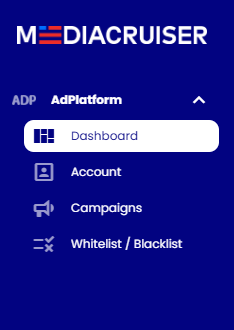
Dashboard: Return to the main overview for performance metrics and quick actions.

Campaigns: Access a full list of active and paused campaigns, with options to edit, pause, or analyze performance in detail.

Account:

  • Profile: Update your company details, contact information, or account preferences.
  • View Users: Manage team roles (e.g., Account User, Account Admin) and set permissions for collaborative campaign management.
  • Payments: Add funds, review Billing History, or update payment methods to keep campaigns running smoothly.
  • Notifications: Configure alerts for critical updates, such as low balance, campaign status changes, or performance thresholds, to stay proactive.
  • Change Log: Track account activity (e.g., campaign updates, user additions) for transparency and audit purposes.
  • Tip: Set up Notifications for low balance alerts to avoid campaign interruptions, and regularly check the Change Log to monitor team activity.

Whitelist / Blacklist: Access a full list of Whitelist / Blacklist groups. Edit, create and review campaigns and sources for each group